TEK7000 GMSL2 Camera Configuration Guide
The TEK7000 platform provides native support for GMSL2 cameras and features two configurable operating modes based on your bandwidth and camera density requirements:
- 8-Camera Mode (2-Lane): : For high-density sensor integration.
- 4-Camera Mode (4-Lane): : For high-bandwidth per channel.
To alter the operational mode, both software configuration and hardware switch adjustments are required. Software settings are pre-configured to the 8-Camera (2-Lane) mode by default. Changes will take effect after system reboot.
Configuration Procedure
Please follow the synchronized software and hardware steps below to switch the MIPI CSI lane allocation.
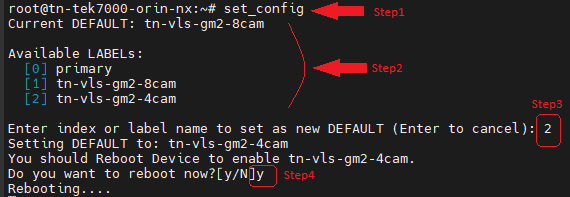
Step 1: Execute the Configuration Script
Access the target device via a local terminal or debug console, and execute the configuration utility:
set_config
Step 2: Review Current Status and Available Profiles
The tool will poll the system to display the active operational profile alongside a comprehensive list of available configuration modes.
Step 3: Select the Boot option
Input the corresponding index number or label to select your desired camera mode, or press Enter to abort the operation without making changes.
Step 4: Initiate System Reboot
Upon selection, the script will prompt for a system reboot:
- Enter
yto trigger an immediate system reboot. - Enter
n(or pressEnter) to exit process and manually reboot the device later.
For example:
Default is 8cam(2lane) mode, switch to 4cam(4lane) mode.
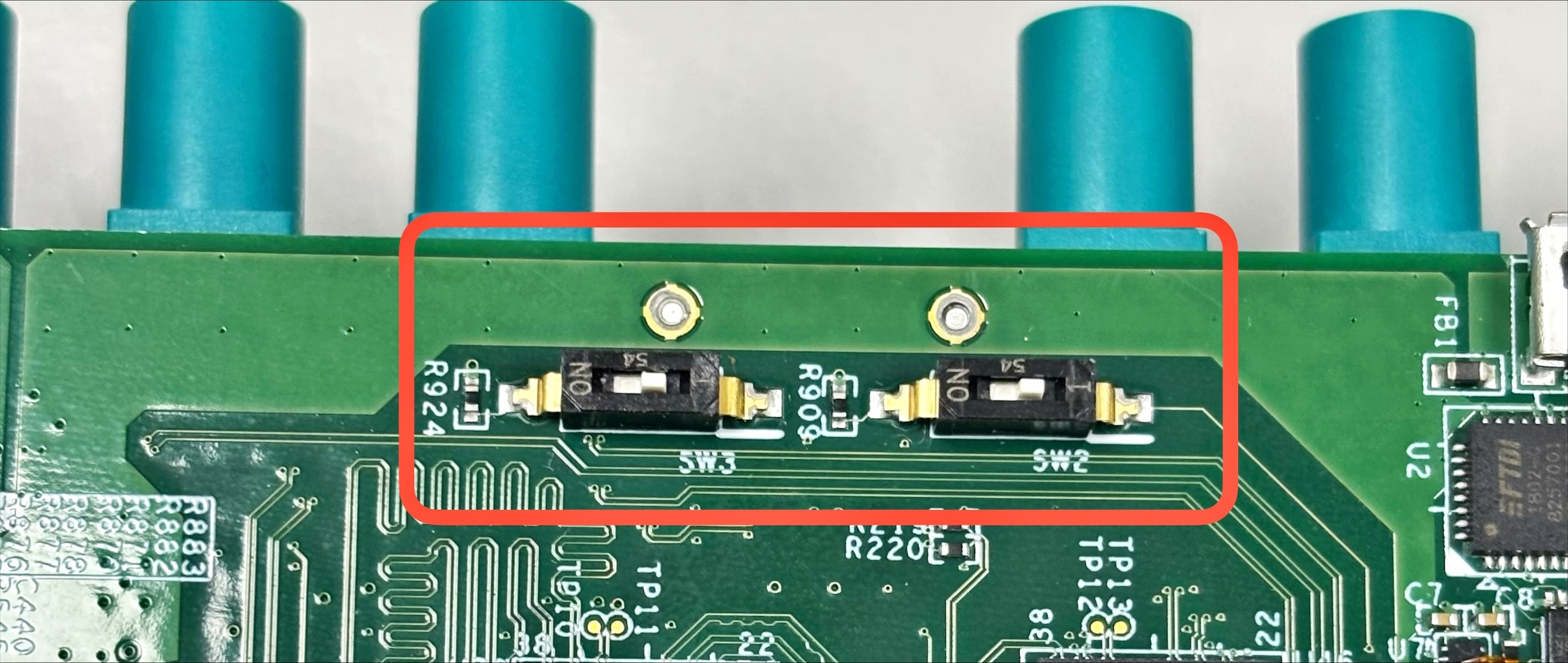
Step 5: Adjust Hardware Switches During Power Cycle
While the device is performing the reboot sequence (or prior to the next boot up), manually adjust the two physical switches located on the carrier board to align with the chosen lane topology.
| Operational Mode | Software Configuration | Carrier Board Hardware Switch |
|---|---|---|
| No camera function | primary | no matter switches |
| 8 Camera (2-Lane) | tn-vls-gm2-8cam | SW2 and SW3 switch ON |
| 4 Camera (4-Lane) | tn-vls-gm2-4cam | SW2 and SW3 switch OFF |
Verification
Post-reboot, you can verify the deployment by re-running the set_config script to ensure the Active Profile matches the physical hardware layout.