Compile Stage
This section provides the steps required to configure the build environment, download the source code, and compile the demo image for the supported Jetson platform.
Git configuration
Install the Repo Tool
mkdir -p ~/.bin
PATH=~/.bin:$PATH
curl http://commondatastorage.googleapis.com/git-repo-downloads/repo > ~/bin/repo
chmod a+rx ~/.bin/repo
Configure Git Identity
git config --global user.name "Your Name"
git config --global user.email "your.email"
Download the TN-JetPack using repo manifest file
Create and enter the workspace folder
$ mkdir <work_folder> && cd <work_folder>
Following use tegra-demo-distro as example.
Get the repo manifest file
-
Go to TechNexion Jetson JetPack manifest github
Selecttn_l4t-r39.2.ga_kernel-6.8branch. -
Click the '< > Code' button
-
Copy the URL of HTTPS. Or using SSH if match the requirement.
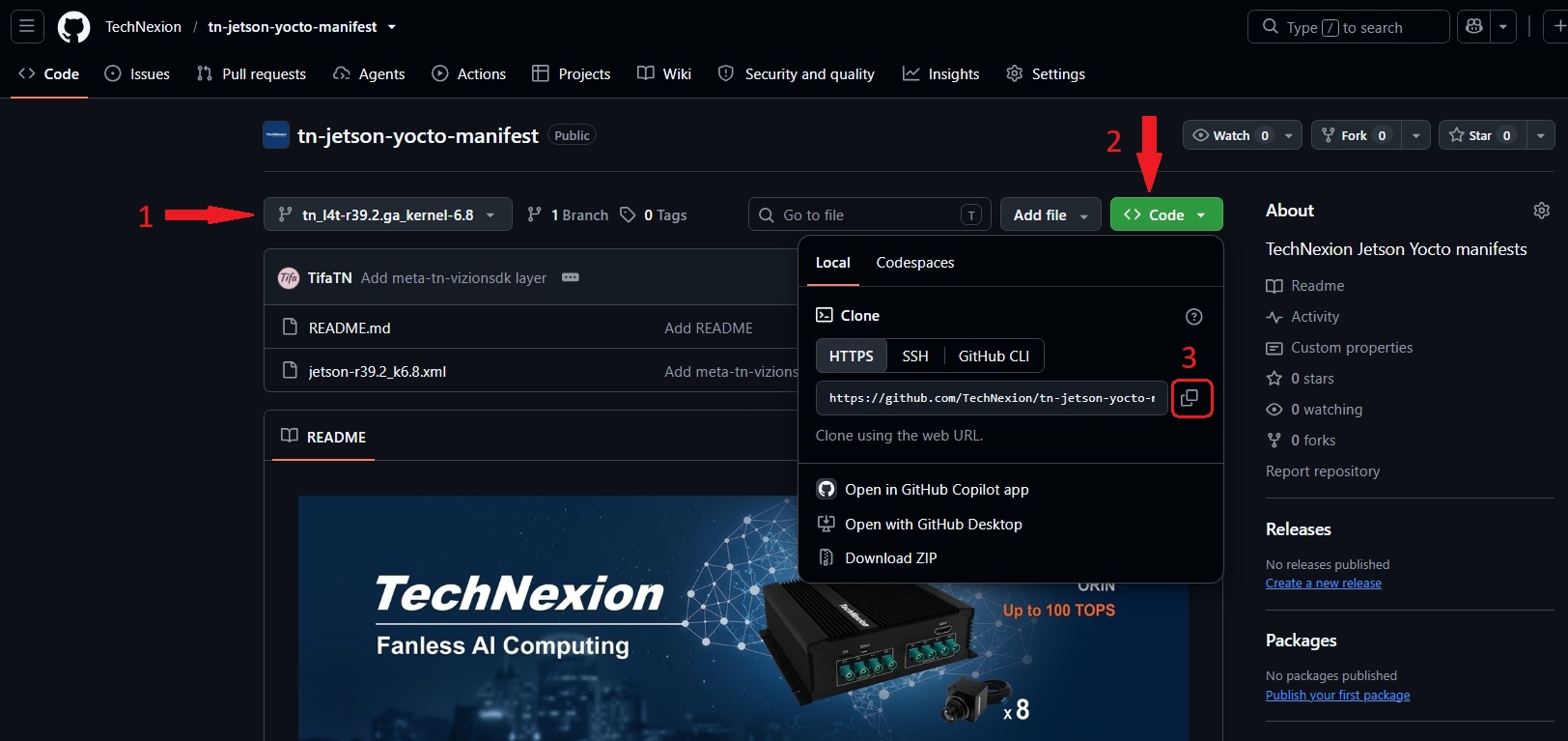
- Using git command to download the source code.
repo init -u https://github.com/TechNexion/tn-jetson-yocto-manifest.git -b tn_l4t-r39.2.ga_kernel-6.8 -m jetson-r39.2_k6.8.xml
repo sync
Build image
Build configurations for supported hardware
| Parameter | Available options | Description |
|---|---|---|
| MACHINE | tn-tek7000-orin-nx | Nvidia Jetson Orin NX 16GB module in TEK-ORIN2 carrier |
| tn-tek7000-orin-nano | Nvidia Jetson Orin NANO 8GB module in TEK-ORIN2 carrier |
$BUILDDIR is specify the build directory, default is "build".
Initialize the Yocto build environment and launch BitBake.
. ./tn-setup-env -m $MACHINE $BUILDDIR
After setup command, switch to $BUILDDIR automatically.
For TEK7000-ORIN-NX
. ./tn-setup-env -m tn-tek7000-orin-nx build-tek7000-orin-nx
bitbake demo-image-full
For TEK7000-ORIN-NANO
. ./tn-setup-env -m tn-tek7000-orin-nano build-tek7000-orin-nano
bitbake demo-image-full
Image Deployment
When the build completes, the generated release image tarball file is $BUILDDIR/tmp/deploy/images/$MACHINE/demo-image-full-${MACHINE}.rootfs.tegraflash-tar.zst.
Follow flash steps to flashing image to TEK-ORIN device.
Tips to speed up compilation
To speed up the build process, use dedicated directories on the host machine for downloaded source files and shared build cache. Reusing cached artifacts helps avoid repeated downloads and rebuilds, significantly reducing overall compilation time and improving development efficiency.
-
create
$BUILDDIR/conf/site.conftouch $BUILDDIR/conf/site.conf -
make folder to store downloaded files and cache.
mkdir -p ${HOME}/src/downloads
mkdir -p ${HOME}/src/sstate-cache -
Add the following configuration in site.conf
SRC ?= "${HOME}/src"
DL_DIR ?= "${SRC}/downloads"
SSTATE_DIR ?= "${SRC}/sstate-cache"
BB_HASHSERVE_DB_DIR = "${SSTATE_DIR}"
You can modify the $SRC as you want.
Partial build
Some bitback commands for partial build.
# compile kernel
bitbake virtual/kernel
# compile device tree
bitbake virtual/dtb
# compile device tree overlay
bitbake virtual/dtbo
# compile oot drivers
bitbake nvidia-kernel-oot
# compile flash variant
bitbake tegra-flashvars