EDM-IMX95 TEVS Camera Usage Guide
🚀 Introduction
This article guides you how to get started using TechNexion camera modules on EDM-IMX95 EVM board.
You must have the background knowledge to modify the kernel configuration, rebuild, and replace the kernel and the device tree source (DTS).
This article uses the IMX95-EVM baseboard as an example, based on the 🔗 Yocto 5.2 (Walnascar) 2026Q1 Release. The corresponding Linux kernel version is 6.6.49_2.2.0.
📸 Supported Camera Modules
- TEVS Series
- VLS-GM2 Series
| Camera Series | Products |
|---|---|
| TEVS | TEVS-AR0144 TEVS-AR0145 TEVS-AR0234 TEVS-AR0235 TEVS-AR0246 TEVS-AR0521 TEVS-AR0522 TEVS-AR0544 TEVS-AR0821 TEVS-AR0822 TEVS-AR0830 TEVS-AR1335 TEVS-AR2020 |
| Camera Series | Products |
|---|---|
| VLS-GM2 | VLS-GM2-AR0144 VLS-GM2-AR0145 VLS-GM2-AR0234 VLS-GM2-AR0235 VLS-GM2-AR0246 VLS-GM2-AR0521 VLS-GM2-AR0522 VLS-GM2-AR0544 VLS-GM2-AR0821 VLS-GM2-AR0822 VLS-GM2-AR0830 VLS-GM2-AR1335 VLS-GM2-AR2020 |
🧩 Supported Boards
| SoM | Board |
|---|---|
| EDM-IMX95 | IMX95-EVM |
🔧 Hardware Setup Instructions
1. Power Supply Preparation
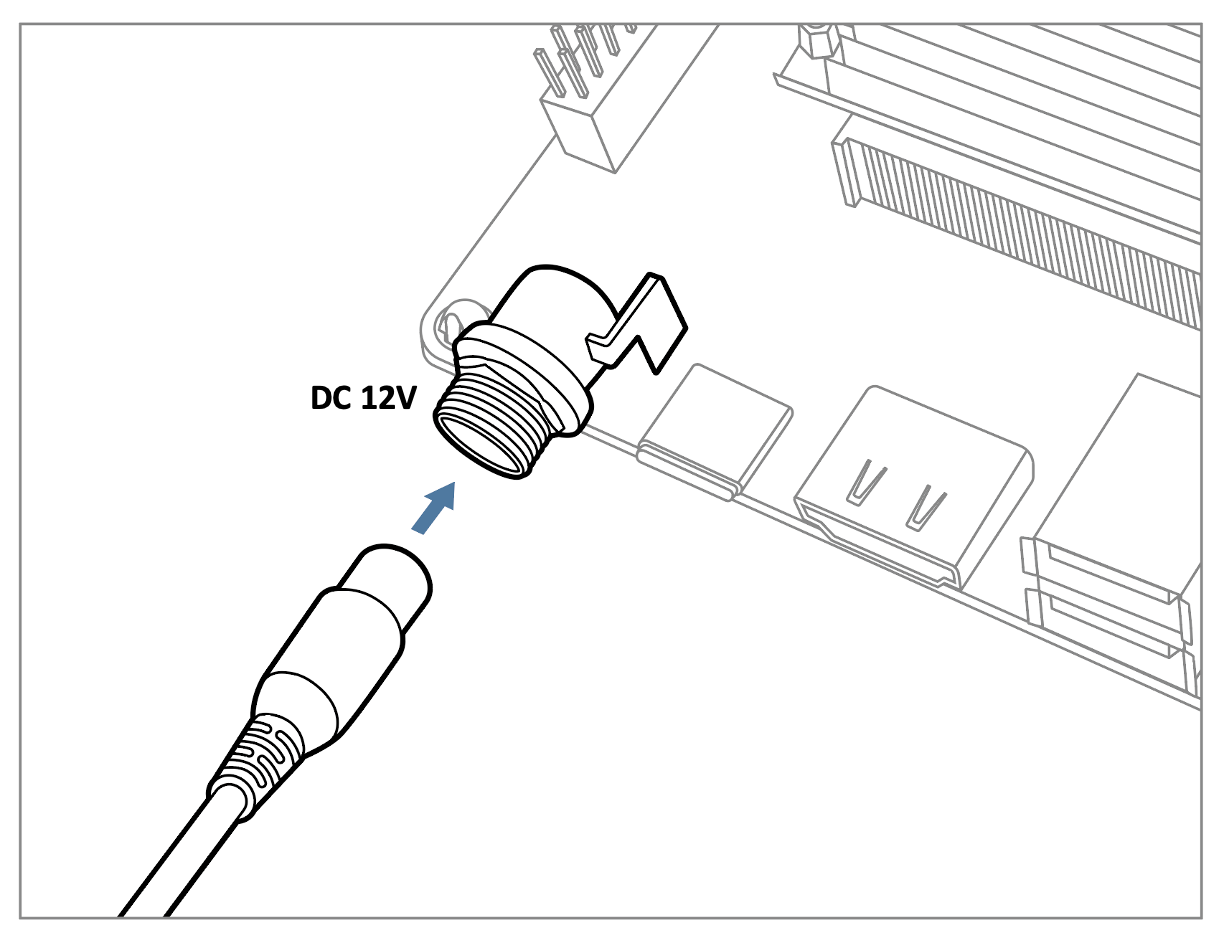
- Use a DC 5V or 12V power cable to supply power to the board.
- If you're using FPD-Link III SerDes, a 12V power adapter (minimum 3A) is required. Connect it via the barrel jack connector.
2. Debug Console Connection
- Prepare a USB-to-UART cable if you're connecting to a PC.
- Connect it to the UART_A_A55 connector.
3. Display Output Connection
- Prepare a 10.1 inch LVDS panel for output display.
- Connect the display to the LVDS connector on the board.
4. Camera Interface (CSI) Overview
- The board features two MIPI-CSI-2 interfaces, referred to as CSI1 and CSI2.
- These use 70-pin board-to-board connectors manufactured by Hirose.
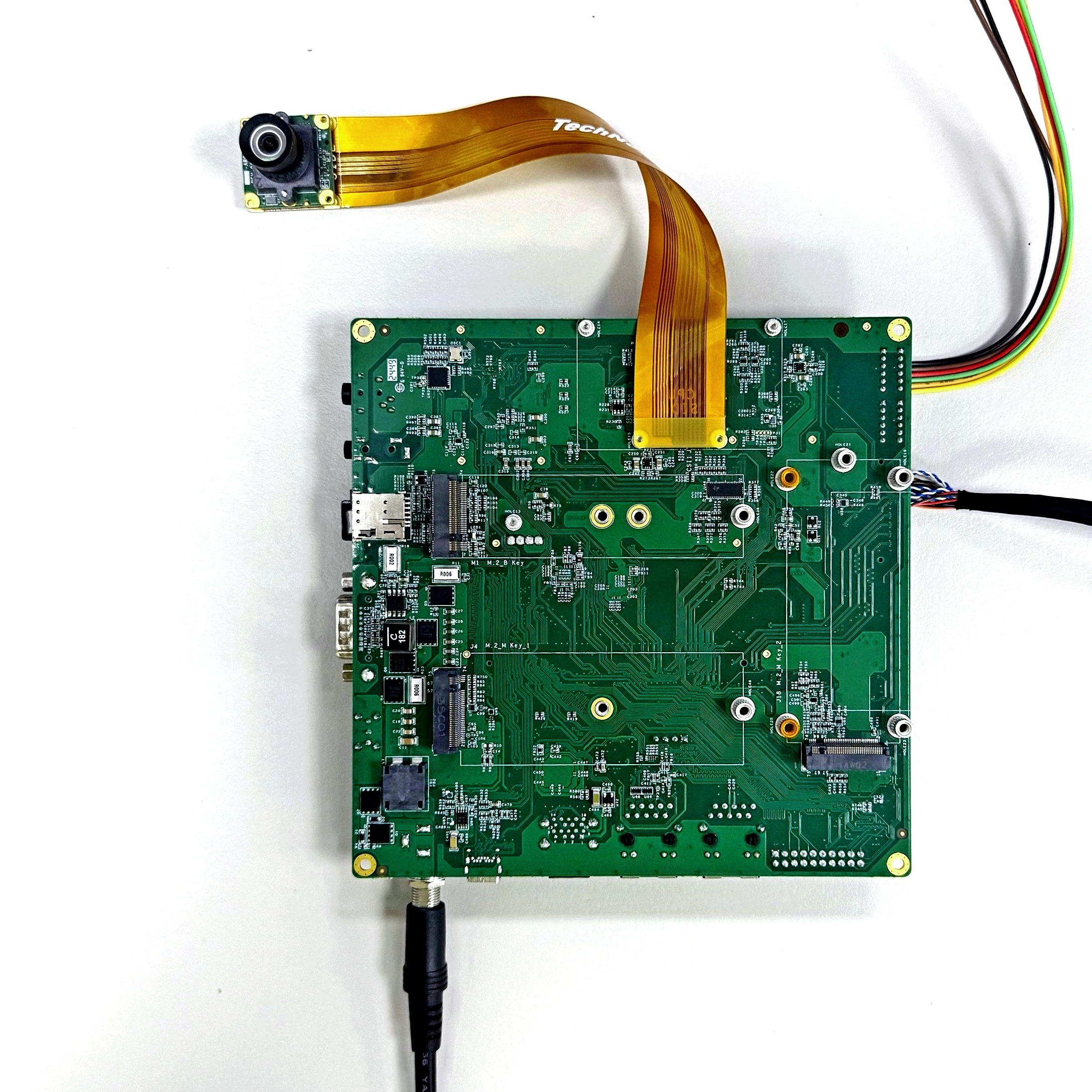
- The image below shows a TEVS camera connected to the CSI2 interface.
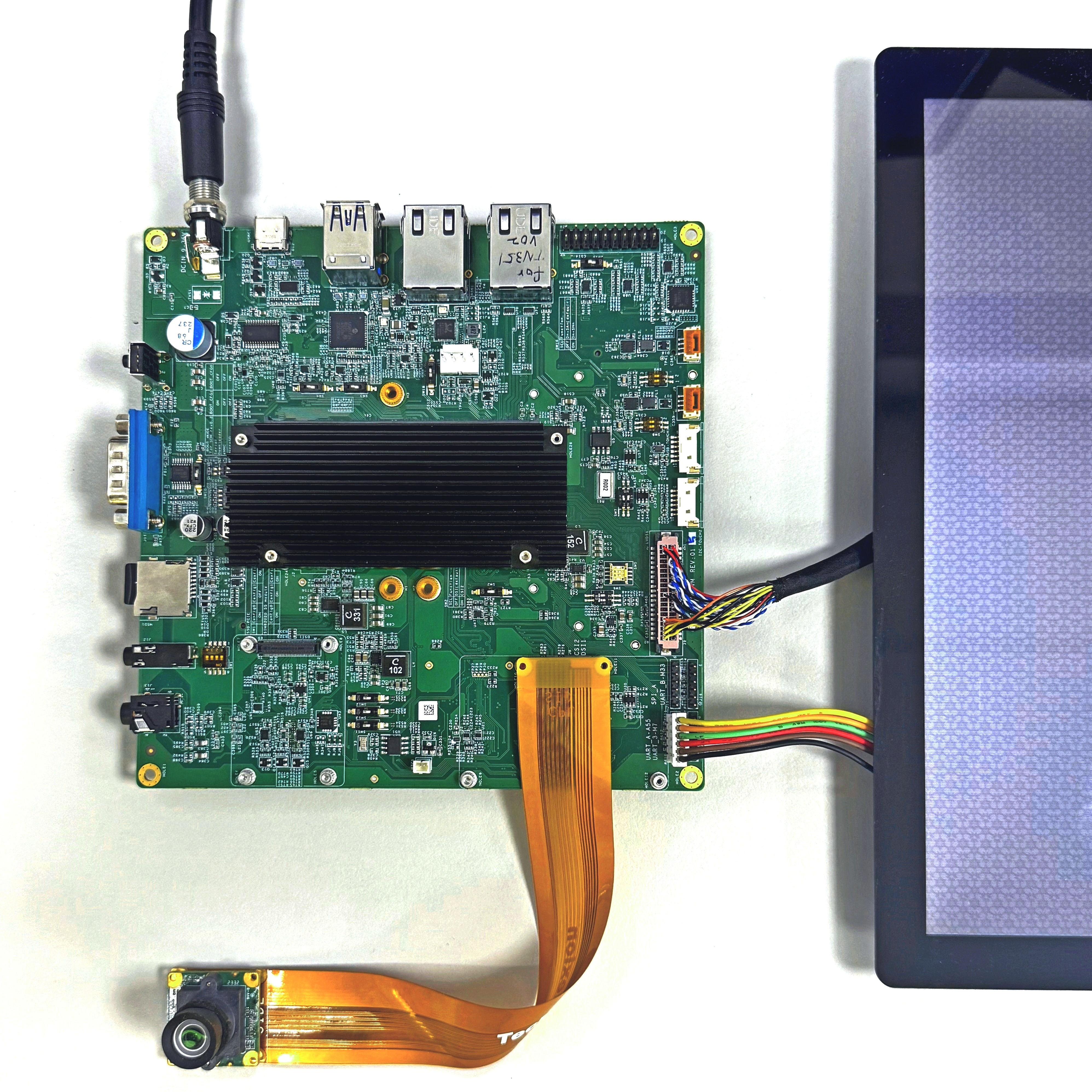
If you are using the CSI2 connector, please remember to set the SW2 switch to the ON position to enable it.
💻 Prepare Yocto demo image for testing TechNexion camera
To test TechNexion cameras, you will need a Yocto-based demo image that includes the necessary device tree blobs and camera drivers.
🔽 Downloading the Demo Image
Prebuilt demo images are available for download on TechNexion's official server.
Download Link:
💾 Flashing the Image
You can flash the image to either e.MMC or an SD Card using one of the following methods:
1. Using uuu Tool (Universal Update Utility)
TechNexion provides a guide to flash the image using the uuu tool:
🔗 How to Flash with UUU
Before flashing, ensure the board is set to Serial Download Mode in the boot configuration.
2. Using ums Command in U-Boot (USB Mass Storage)
Alternatively, you can write the image directly to flash storage over USB-OTG using U-Boot’s ums command:
🔗 Using UMS in U-Boot
The board must be booted with a version of U-Boot that supports the ums command. Typically, this is done from the existing e.MMC.
🛠️ Build Yocto
TechNexion supports building a Yocto-based Linux image tailored for camera modules using the following kernel and branch.
📦 Supported Linux Kernel
| Linux Kernel Version | Yocto Branch |
|---|---|
| 6.12.49 | tn-imx_6.12.49_2.2.0-stable |
📁 Source and Build Instructions
🔗 Fetch Yocto Source
📖 Build Yocto (Instructions for EDM-IMX95)
📸 Camera Testing Instructions
Specify Camera DTBO in U-Boot
-
Connect the debug console cable to carrier board.
-
Power on the board and interrupt the boot process. Keep pressing
Enterwhen the following message appears:Hit any key to stop autoboot: -
Specify the appropriate device tree for cameras using the
dtoverlayenvironment variable in U-Boot:
u-boot=> setenv dtoverlay lvds-vl10112880 tevs-csi0 tevs-csi1
The command above is an example for connecting two cameras simultaneously. If only one camera is connected, simply select the corresponding DTBO for the CSI port.
- Continue boot process.
u-boot=> saveenv
u-boot=> boot
🎥 Start Camera Video Stream via GStreamer
Launch GStreamer Pipeline
-
List supported cameras:
$ cam -l
...
Available cameras:
1: 'tevs' (/base/soc/bus@44000000/i2c@44350000/tevs@48)
2: 'tevs' (/base/soc/bus@42000000/i2c@42540000/tevs@48)
This command will display available cameras and their names.
-
Check supported resolutions:
$ cam -c 1 --info
...
Using camera /base/soc/bus@44000000/i2c@44350000/tevs@48 as cam0
0: 1280x800-YUYV/Rec709/sRGB/Rec601/Limited
 * Pixelformat: NV12 (640x480)-(1280x800)/(+0,+0)
  - 640x480
  - 1280x720
  - 1280x800
 * Pixelformat: ABGR8888 (640x480)-(1280x800)/(+0,+0)
  - 640x480
  - 1280x720
  - 1280x800
 * Pixelformat: BGR888 (640x480)-(1280x800)/(+0,+0)
  - 640x480
  - 1280x720
  - 1280x800
 * Pixelformat: RGB888 (640x480)-(1280x800)/(+0,+0)
  - 640x480
  - 1280x720
  - 1280x800
 * Pixelformat: XRGB8888 (640x480)-(1280x800)/(+0,+0)
  - 640x480
  - 1280x720
  - 1280x800
 * Pixelformat: YUV444 (640x480)-(1280x800)/(+0,+0)
  - 640x480
  - 1280x720
  - 1280x800
 * Pixelformat: RGB565 (640x480)-(1280x800)/(+0,+0)
  - 640x480
  - 1280x720
  - 1280x800
 * Pixelformat: NV16 (640x480)-(1280x800)/(+0,+0)
  - 640x480
  - 1280x720
  - 1280x800
 * Pixelformat: YUYV (640x480)-(1280x800)/(+0,+0)
  - 640x480
  - 1280x720
  - 1280x800
 * Pixelformat: AVUY8888 (640x480)-(1280x800)/(+0,+0)
  - 640x480
  - 1280x720
  - 1280x800
Replace
1with the camera number from the previous step. This shows all supported pixel formats and resolutions. -
Launch GStreamer pipeline with libcamerasrc:
$ gst-launch-1.0 libcamerasrc camera-name=$CAMERA_NAME ! \
  video/x-raw,format=YUY2,width=<res_w>,height=<res_h> ! \
  waylandsink sync=false
Replace
$CAMERA_NAMEwith the actual camera name from step 1, and<res_w>and<res_h>with your desired resolution (e.g., 1280x720).Recommended FormatYUY2 (YUYV) format is recommended for optimal performance and compatibility with most display sinks.
Check Media Controller
We can get media controller as below :
$ media-ctl -p
Media controller API version 6.12.49

Media device information
------------------------
driver          mxc-isi
model           FSL Capture Media Device
serial
bus info        platform:4ad50000.isi
hw revision     0x0
driver version  6.12.49

Device topology
- entity 1: crossbar (13 pads, 11 links, 2 routes)
            type V4L2 subdev subtype Unknown flags 0
            device node name /dev/v4l-subdev0
        routes:
                2/0 -> 5/0 [ACTIVE]
                3/0 -> 6/0 [ACTIVE]
        pad0: SINK,MUST_CONNECT
        pad1: SINK,MUST_CONNECT
        pad2: SINK,MUST_CONNECT
                [stream:0 fmt:UYVY8_1X16/1920x1080 field:none colorspace:srgb xfer:srgb ycbcr:601 quantization:lim-range]
                <- "4ac10000.syscon:formatter@20":1 [ENABLED,IMMUTABLE]
        pad3: SINK,MUST_CONNECT
                [stream:0 fmt:UYVY8_1X16/1280x720 field:none colorspace:jpeg]
                <- "4ac10000.syscon:formatter@120":1 [ENABLED,IMMUTABLE]
        pad4: SINK,MUST_CONNECT
                <- "mxc_isi.output":0 [ENABLED,IMMUTABLE]
        pad5: SOURCE
                [stream:0 fmt:UYVY8_1X16/1920x1080 field:none colorspace:srgb xfer:srgb ycbcr:601 quantization:lim-range]
                -> "mxc_isi.0":0 [ENABLED,IMMUTABLE]
        pad6: SOURCE
                [stream:0 fmt:UYVY8_1X16/1280x720 field:none colorspace:jpeg]
                -> "mxc_isi.1":0 [ENABLED,IMMUTABLE]
        pad7: SOURCE
                -> "mxc_isi.2":0 [ENABLED,IMMUTABLE]
        pad8: SOURCE
                -> "mxc_isi.3":0 [ENABLED,IMMUTABLE]
        pad9: SOURCE
                -> "mxc_isi.4":0 [ENABLED,IMMUTABLE]
        pad10: SOURCE
                -> "mxc_isi.5":0 [ENABLED,IMMUTABLE]
        pad11: SOURCE
                -> "mxc_isi.6":0 [ENABLED,IMMUTABLE]
        pad12: SOURCE
                -> "mxc_isi.7":0 [ENABLED,IMMUTABLE]

- entity 15: mxc_isi.0 (2 pads, 2 links, 0 routes)
             type V4L2 subdev subtype Unknown flags 0
             device node name /dev/v4l-subdev1
        pad0: SINK
                [stream:0 fmt:UYVY8_1X16/1280x720 field:none colorspace:jpeg
                 compose.bounds:(0,0)/1280x720
                 compose:(0,0)/1280x720]
                <- "crossbar":5 [ENABLED,IMMUTABLE]
        pad1: SOURCE
                [stream:0 fmt:YUV8_1X24/1280x720 field:none colorspace:jpeg
                 crop.bounds:(0,0)/1280x720
                 crop:(0,0)/1280x720]
                -> "mxc_isi.0.capture":0 [ENABLED,IMMUTABLE]

- entity 18: mxc_isi.0.capture (1 pad, 1 link)
             type Node subtype V4L flags 0
             device node name /dev/video0
        pad0: SINK
                <- "mxc_isi.0":1 [ENABLED,IMMUTABLE]

- entity 26: mxc_isi.1 (2 pads, 2 links, 0 routes)
             type V4L2 subdev subtype Unknown flags 0
             device node name /dev/v4l-subdev2
        pad0: SINK
                [stream:0 fmt:UYVY8_1X16/1280x720 field:none colorspace:jpeg
                 compose.bounds:(0,0)/1280x720
                 compose:(0,0)/1280x720]
                <- "crossbar":6 [ENABLED,IMMUTABLE]
        pad1: SOURCE
                [stream:0 fmt:YUV8_1X24/1280x720 field:none colorspace:jpeg
                 crop.bounds:(0,0)/1280x720
                 crop:(0,0)/1280x720]
                -> "mxc_isi.1.capture":0 [ENABLED,IMMUTABLE]

- entity 29: mxc_isi.1.capture (1 pad, 1 link)
             type Node subtype V4L flags 0
             device node name /dev/video1
        pad0: SINK
                <- "mxc_isi.1":1 [ENABLED,IMMUTABLE]

- entity 37: mxc_isi.2 (2 pads, 2 links, 0 routes)
             type V4L2 subdev subtype Unknown flags 0
             device node name /dev/v4l-subdev3
        pad0: SINK
                [stream:0 fmt:UYVY8_1X16/1920x1080 field:none colorspace:jpeg xfer:srgb ycbcr:601 quantization:full-range
                 compose.bounds:(0,0)/1920x1080
                 compose:(0,0)/1920x1080]
                <- "crossbar":7 [ENABLED,IMMUTABLE]
        pad1: SOURCE
                [stream:0 fmt:YUV8_1X24/1920x1080 field:none colorspace:jpeg xfer:srgb ycbcr:601 quantization:full-range
                 crop.bounds:(0,0)/1920x1080
                 crop:(0,0)/1920x1080]
                -> "mxc_isi.2.capture":0 [ENABLED,IMMUTABLE]

- entity 40: mxc_isi.2.capture (1 pad, 1 link)
             type Node subtype V4L flags 0
             device node name /dev/video2
        pad0: SINK
                <- "mxc_isi.2":1 [ENABLED,IMMUTABLE]

- entity 48: mxc_isi.3 (2 pads, 2 links, 0 routes)
             type V4L2 subdev subtype Unknown flags 0
             device node name /dev/v4l-subdev4
        pad0: SINK
                [stream:0 fmt:UYVY8_1X16/1920x1080 field:none colorspace:jpeg xfer:srgb ycbcr:601 quantization:full-range
                 compose.bounds:(0,0)/1920x1080
                 compose:(0,0)/1920x1080]
                <- "crossbar":8 [ENABLED,IMMUTABLE]
        pad1: SOURCE
                [stream:0 fmt:YUV8_1X24/1920x1080 field:none colorspace:jpeg xfer:srgb ycbcr:601 quantization:full-range
                 crop.bounds:(0,0)/1920x1080
                 crop:(0,0)/1920x1080]
                -> "mxc_isi.3.capture":0 [ENABLED,IMMUTABLE]

- entity 51: mxc_isi.3.capture (1 pad, 1 link)
             type Node subtype V4L flags 0
             device node name /dev/video3
        pad0: SINK
                <- "mxc_isi.3":1 [ENABLED,IMMUTABLE]

- entity 59: mxc_isi.4 (2 pads, 2 links, 0 routes)
             type V4L2 subdev subtype Unknown flags 0
             device node name /dev/v4l-subdev5
        pad0: SINK
                [stream:0 fmt:UYVY8_1X16/1920x1080 field:none colorspace:jpeg xfer:srgb ycbcr:601 quantization:full-range
                 compose.bounds:(0,0)/1920x1080
                 compose:(0,0)/1920x1080]
                <- "crossbar":9 [ENABLED,IMMUTABLE]
        pad1: SOURCE
                [stream:0 fmt:YUV8_1X24/1920x1080 field:none colorspace:jpeg xfer:srgb ycbcr:601 quantization:full-range
                 crop.bounds:(0,0)/1920x1080
                 crop:(0,0)/1920x1080]
                -> "mxc_isi.4.capture":0 [ENABLED,IMMUTABLE]

- entity 62: mxc_isi.4.capture (1 pad, 1 link)
             type Node subtype V4L flags 0
             device node name /dev/video4
        pad0: SINK
                <- "mxc_isi.4":1 [ENABLED,IMMUTABLE]

- entity 70: mxc_isi.5 (2 pads, 2 links, 0 routes)
             type V4L2 subdev subtype Unknown flags 0
             device node name /dev/v4l-subdev6
        pad0: SINK
                [stream:0 fmt:UYVY8_1X16/1920x1080 field:none colorspace:jpeg xfer:srgb ycbcr:601 quantization:full-range
                 compose.bounds:(0,0)/1920x1080
                 compose:(0,0)/1920x1080]
                <- "crossbar":10 [ENABLED,IMMUTABLE]
        pad1: SOURCE
                [stream:0 fmt:YUV8_1X24/1920x1080 field:none colorspace:jpeg xfer:srgb ycbcr:601 quantization:full-range
                 crop.bounds:(0,0)/1920x1080
                 crop:(0,0)/1920x1080]
                -> "mxc_isi.5.capture":0 [ENABLED,IMMUTABLE]

- entity 73: mxc_isi.5.capture (1 pad, 1 link)
             type Node subtype V4L flags 0
             device node name /dev/video5
        pad0: SINK
                <- "mxc_isi.5":1 [ENABLED,IMMUTABLE]

- entity 81: mxc_isi.6 (2 pads, 2 links, 0 routes)
             type V4L2 subdev subtype Unknown flags 0
             device node name /dev/v4l-subdev7
        pad0: SINK
                [stream:0 fmt:UYVY8_1X16/1920x1080 field:none colorspace:jpeg xfer:srgb ycbcr:601 quantization:full-range
                 compose.bounds:(0,0)/1920x1080
                 compose:(0,0)/1920x1080]
                <- "crossbar":11 [ENABLED,IMMUTABLE]
        pad1: SOURCE
                [stream:0 fmt:YUV8_1X24/1920x1080 field:none colorspace:jpeg xfer:srgb ycbcr:601 quantization:full-range
                 crop.bounds:(0,0)/1920x1080
                 crop:(0,0)/1920x1080]
                -> "mxc_isi.6.capture":0 [ENABLED,IMMUTABLE]

- entity 84: mxc_isi.6.capture (1 pad, 1 link)
             type Node subtype V4L flags 0
             device node name /dev/video6
        pad0: SINK
                <- "mxc_isi.6":1 [ENABLED,IMMUTABLE]

- entity 92: mxc_isi.7 (2 pads, 2 links, 0 routes)
             type V4L2 subdev subtype Unknown flags 0
             device node name /dev/v4l-subdev8
        pad0: SINK
                [stream:0 fmt:UYVY8_1X16/1920x1080 field:none colorspace:jpeg xfer:srgb ycbcr:601 quantization:full-range
                 compose.bounds:(0,0)/1920x1080
                 compose:(0,0)/1920x1080]
                <- "crossbar":12 [ENABLED,IMMUTABLE]
        pad1: SOURCE
                [stream:0 fmt:YUV8_1X24/1920x1080 field:none colorspace:jpeg xfer:srgb ycbcr:601 quantization:full-range
                 crop.bounds:(0,0)/1920x1080
                 crop:(0,0)/1920x1080]
                -> "mxc_isi.7.capture":0 [ENABLED,IMMUTABLE]

- entity 95: mxc_isi.7.capture (1 pad, 1 link)
             type Node subtype V4L flags 0
             device node name /dev/video7
        pad0: SINK
                <- "mxc_isi.7":1 [ENABLED,IMMUTABLE]

- entity 103: mxc_isi.output (1 pad, 1 link)
              type Node subtype V4L flags 0
        pad0: SOURCE
                -> "crossbar":4 [ENABLED,IMMUTABLE]

- entity 110: 4ac10000.syscon:formatter@20 (2 pads, 2 links, 1 route)
              type V4L2 subdev subtype Unknown flags 0
              device node name /dev/v4l-subdev9
        routes:
                0/0 -> 1/0 [ACTIVE]
        pad0: SINK
                [stream:0 fmt:UYVY8_1X16/1920x1080 field:none colorspace:smpte170m xfer:709 ycbcr:601 quantization:lim-range]
                <- "csidev-4ad30000.csi":1 [ENABLED,IMMUTABLE]
        pad1: SOURCE
                [stream:0 fmt:UYVY8_1X16/1920x1080 field:none colorspace:smpte170m xfer:709 ycbcr:601 quantization:lim-range]
                -> "crossbar":2 [ENABLED,IMMUTABLE]

- entity 115: csidev-4ad30000.csi (2 pads, 2 links, 1 route)
              type V4L2 subdev subtype Unknown flags 0
              device node name /dev/v4l-subdev10
        routes:
                0/0 -> 1/0 [ACTIVE]
        pad0: SINK
                [stream:0 fmt:UYVY8_1X16/1920x1080 field:none colorspace:smpte170m xfer:709 ycbcr:601 quantization:lim-range]
                <- "tevs 1-0048":0 [ENABLED]
        pad1: SOURCE
                [stream:0 fmt:UYVY8_1X16/1920x1080 field:none colorspace:smpte170m xfer:709 ycbcr:601 quantization:lim-range]
                -> "4ac10000.syscon:formatter@20":0 [ENABLED,IMMUTABLE]

- entity 120: tevs 1-0048 (1 pad, 1 link, 0 routes)
              type V4L2 subdev subtype Sensor flags 0
              device node name /dev/v4l-subdev11
        pad0: SOURCE
                [stream:0 fmt:UYVY8_1X16/1280x720@1/60 field:none colorspace:srgb xfer:srgb ycbcr:601 quantization:full-range
                 crop.bounds:(0,0)/1280x720
                 crop:(0,0)/1280x720]
                -> "csidev-4ad30000.csi":0 [ENABLED]

- entity 124: 4ac10000.syscon:formatter@120 (2 pads, 2 links, 1 route)
              type V4L2 subdev subtype Unknown flags 0
              device node name /dev/v4l-subdev12
        routes:
                0/0 -> 1/0 [ACTIVE]
        pad0: SINK
                [stream:0 fmt:UYVY8_1X16/1280x720 field:none colorspace:jpeg]
                <- "csidev-4ad40000.csi":1 [ENABLED,IMMUTABLE]
        pad1: SOURCE
                [stream:0 fmt:UYVY8_1X16/1280x720 field:none colorspace:jpeg]
                -> "crossbar":3 [ENABLED,IMMUTABLE]

- entity 129: csidev-4ad40000.csi (2 pads, 2 links, 1 route)
              type V4L2 subdev subtype Unknown flags 0
              device node name /dev/v4l-subdev13
        routes:
                0/0 -> 1/0 [ACTIVE]
        pad0: SINK
                [stream:0 fmt:UYVY8_1X16/1280x720 field:none colorspace:jpeg]
                <- "tevs 3-0048":0 [ENABLED]
        pad1: SOURCE
                [stream:0 fmt:UYVY8_1X16/1280x720 field:none colorspace:jpeg]
                -> "4ac10000.syscon:formatter@120":0 [ENABLED,IMMUTABLE]

- entity 134: tevs 3-0048 (1 pad, 1 link, 0 routes)
              type V4L2 subdev subtype Sensor flags 0
              device node name /dev/v4l-subdev14
        pad0: SOURCE
                [stream:0 fmt:UYVY8_1X16/1280x720@1/60 field:none colorspace:srgb xfer:srgb ycbcr:601 quantization:full-range
                 crop.bounds:(0,0)/1280x720
                 crop:(0,0)/1280x720]
                -> "csidev-4ad40000.csi":0 [ENABLED]
🚨 Troubleshooting
Verify Camera Initialization
Use dmesg to check if the TEVS camera module was initialized correctly.
$ dmesg| grep tevs
[    4.212446] tevs 1-0048: tevs_probe() device node: tevs@48
[    4.738444] tevs 1-0048: Version:25.8.0.1
[    4.746502] tevs 1-0048: Product:TEVS-AR0144, HeaderVer:3, MIPI_Rate:800
[    4.753743] tevs 1-0048: Chip ID: 0x0000
[    4.779782] tevs 1-0048: probe success
[    4.935348] tevs 3-0048: tevs_probe() device node: tevs@48
[    5.474683] tevs 3-0048: Version:25.3.0.2
[    5.482921] tevs 3-0048: Product:TEVS-AR0144, HeaderVer:3, MIPI_Rate:800
[    5.489869] tevs 3-0048: Chip ID: 0x0000
[    5.528728] tevs 3-0048: probe success
Check Available Devices
Verify that the video devices are available.
$ v4l2-ctl --list-device
Example output:
mxc-isi-cap (platform:4ad50000.isi):
        /dev/video0
        /dev/video1
        /dev/video2
        /dev/video3
        /dev/video4
        /dev/video5
        /dev/video6
        /dev/video7
        /dev/video8
        /dev/media0

mxc-jpeg codec (platform:4c500000.jpegdec):
        /dev/video11

mxc-jpeg codec (platform:4c550000.jpegenc):
        /dev/video12

wave6-dec (platform:wave6-dec):
        /dev/video9

wave6-enc (platform:wave6-enc):
        /dev/video10
Ensure that /dev/media0 is present in the device list. This media controller device is essential for configuring the camera pipeline and managing the video capture interfaces.